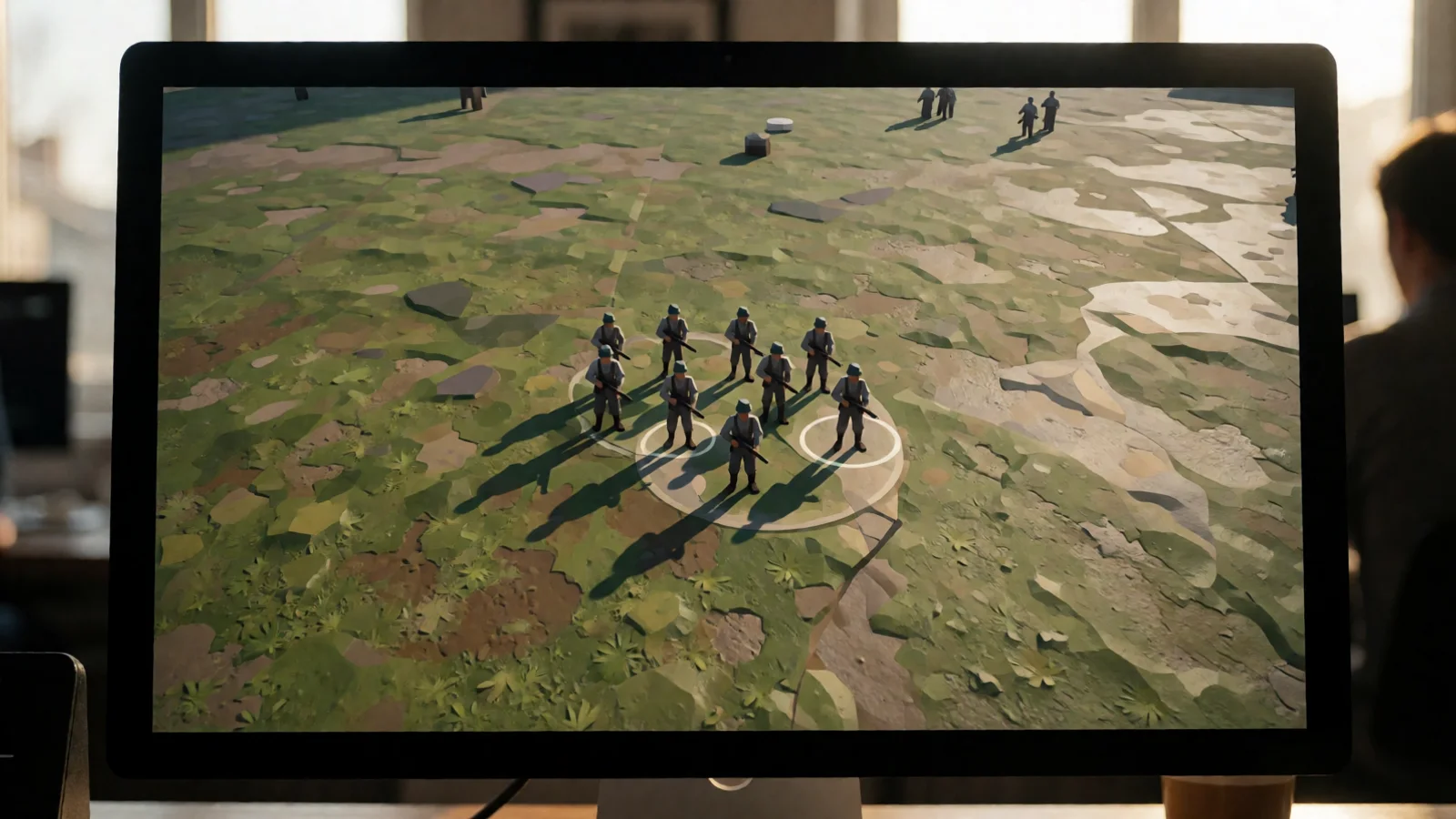
Best Unity Assets to Supercharge Your Game Development
The best Unity assets are specialized tools, systems, and content packs that solve common development challenges, letting you ship games faster without sacrificing quality. From advanced object pooling and leveling frameworks to icon generation and unit selection systems, the right assets can cut months off your production timeline. According to Unity's 2024 Gaming Report, over 70% of mobile games now use at least one third-party asset from the Unity Asset Store. Whether you're building an RTS, RPG, or hyper-casual mobile title, choosing proven, well-documented assets from developers like RealSoft Games gives you a competitive edge. This guide breaks down the best Unity assets by category, with real-world data, comparisons, and actionable recommendations.
Why the Best Unity Assets Matter for Your Project
Every Unity developer faces the same bottleneck: time. Building every system from scratch—loading screens, achievement tracking, object pooling, or UI icon generation—takes hundreds of hours. The best Unity assets eliminate that bottleneck. They are pre-built, battle-tested, and optimized for performance. A 2023 survey by Game Developer magazine found that teams using curated asset libraries reduced their prototyping phase by an average of 42%. That's nearly half your pre-production time reclaimed. Whether you're a solo indie developer or part of a larger studio, integrating the right assets into your workflow is not a shortcut—it's a smart engineering decision.
How Do I Choose the Best Unity Assets for My Genre?
The best Unity asset for you depends on your game's genre and technical requirements. For RTS or strategy games, you need a robust unit selection system. For RPGs and progression-heavy titles, a flexible leveling system is non-negotiable. For mobile or performance-critical projects, object pooling and efficient spawning are essential. Start by auditing your project's most repetitive or complex systems. If you're writing the same boilerplate code for the third time, an asset exists to replace it. Look for assets with active documentation, recent updates, and responsive support channels. The Unity Extensions Documentation from RealSoft Games is a great example of how thorough technical docs should look for any asset you consider.
"The best Unity assets aren't just code—they're a promise that you won't have to reinvent the wheel on your next project."
— RealSoft Games Development Team
Top Categories of Best Unity Assets in 2025
Not all Unity assets are created equal. The best Unity assets fall into clear categories based on the problems they solve. Understanding these categories helps you prioritize your purchases. Here are the most impactful categories for modern Unity development:
- Gameplay Systems: Leveling, achievements, unit selection, and quest frameworks
- Performance & Optimization: Object pooling, spawn management, and memory allocators
- UI & Visual Tools: Icon generation, loading screens, and transition systems
- Networking & Backend: RPC systems, cloud saves, and multiplayer frameworks
- Content & Art: 3D models, audio packs, and environment kits
Each category addresses a specific pain point. For example, if your game spawns hundreds of enemies or projectiles, a pooling system is mandatory to avoid garbage collection spikes. If you're building a mobile RPG, a leveling system with customizable experience curves saves weeks of design iteration. The key is identifying which systems are generic enough to be asset-ified, and which are too bespoke for your game's unique identity.
Gameplay Systems: The Backbone of Every Game
Gameplay systems are the most valuable category of best Unity assets because they directly affect your game's core loop. A flexible leveling system, for instance, handles experience curves, level-up events, and stat progression. The Advanced Leveling System from RealSoft Games includes over 40 different algorithms for experience calculation, hand-drawn curve patterns, and granular EXP granting rules. That level of flexibility means you can design progression for anything from a casual mobile game to a hardcore RPG without writing custom math. Similarly, an achievement system that persists data to MongoDB cloud saves or local JSON files—like the Advanced Achievement System—gives you cross-platform player retention features out of the box.
For strategy games, unit selection is a foundational mechanic. The Unit Selection package from RealSoft Games provides simple, RTS-style selection with support for both single and multiple unit selection. It's lightweight, well-documented, and integrates cleanly with existing input systems. If you're building an RTS, MOBA, or tactical RPG, this asset saves you from wrestling with raycasting, drag boxes, and selection rings for weeks.
Before buying any gameplay system asset, check the documentation quality. A well-documented asset like the Unity Extensions Tutorial can save you more time than the asset itself. Look for API references, code samples, and setup guides.
Performance-Focused Best Unity Assets: Pooling and Spawning
Performance is where many Unity projects fail. Garbage collection hiccups, instantiation spikes, and draw call explosions are silent killers. The best Unity assets for performance address these issues head-on. Object pooling is the most critical optimization for any game that spawns and destroys objects frequently—bullets, enemies, particles, UI elements. Instead of destroying and re-instantiating objects, pooling reuses them from a pre-allocated pool, eliminating garbage collection overhead entirely.
The Spawner Advanced & Pooling asset from RealSoft Games combines advanced object pooling with a wave-based spawning system. It's designed for Unity developers who need both performance and control. You get configurable pool sizes, automatic pool growth, and wave definitions that let you script enemy encounters, item drops, or environmental hazards with precision. This is the kind of asset that directly impacts your frame rate on low-end mobile devices—where every millisecond counts.
Object Pooling vs. Instantiation: A Data Comparison
The numbers tell the story. Instantiating and destroying objects in Unity triggers garbage collection, which causes frame rate stutters. Pooling avoids this entirely. Here's a comparison based on common Unity profiling data:
| Metric | Standard Instantiation | Object Pooling |
|---|---|---|
| Average GC Allocations per 1000 spawns | ~850 KB | ~0 KB (pre-allocated) |
| Frame time impact (mobile, 60 FPS target) | 3-8 ms spikes | 0.2-0.5 ms flat |
| Memory fragmentation risk | High | Low |
| Scalability to 500+ active objects | Poor | Excellent |
As the table shows, pooling is not a marginal improvement—it's a fundamental shift in how your game manages memory. For mobile developers targeting 60 FPS on mid-range devices, this is the difference between a smooth experience and a stuttering mess. The best Unity assets for pooling include built-in diagnostics, automatic pool resizing, and wave management tools that make implementation straightforward.
UI and Visual Tools: The Best Unity Assets for Polish
Players judge your game in the first five seconds. UI polish matters. The best Unity assets for visual quality help you create professional interfaces without hiring a dedicated UI artist. Loading screens, for example, are often an afterthought—but they're the first thing players see. The Advanced Loading Screen asset from RealSoft Games provides async and additive scene loading with customizable UI, audio cues, tips display, and smooth transitions. Instead of a black screen with a spinner, you get a branded, engaging loading experience that keeps players immersed.
Another often-overlooked visual challenge is icon generation. Creating 2D icons from 3D models is tedious manual work. The Icon Architect Studio asset transforms your 3D models into stunning 2D icons directly within Unity. This is invaluable for inventory systems, skill trees, achievement badges, or any UI element that needs consistent, high-quality iconography. Instead of exporting to Blender, rendering, and hand-editing, you get a one-click pipeline inside your existing workflow.
Icon Generation Workflow Comparison
| Workflow Step | Manual Pipeline (Blender + Photoshop) | Icon Architect Studio |
|---|---|---|
| Model export and import | 15-30 minutes per model | 0 minutes (in-engine) |
| Rendering and lighting setup | 10-20 minutes per icon | Automated presets |
| Batch processing 50+ icons | Multiple hours | Under 10 minutes |
| Consistency across icon set | Manual, error-prone | Guaranteed by templates |
The time savings are dramatic. For a game with 100+ items, weapons, or abilities, manual icon generation can eat an entire week of development time. The best Unity assets for visual work automate the repetitive parts so you can focus on creative direction instead of busywork.
When evaluating UI assets, always check for customization depth. Can you change colors, fonts, layouts, and animations? The best Unity assets are flexible enough to match your game's art direction without looking like a template.
Best Unity Assets for Networking and Backend Systems
Multiplayer and cloud features are increasingly expected in modern games. But networking is hard. The best Unity assets for backend systems abstract away the complexity of sockets, serialization, and server management. If you're building a distributed application or a multiplayer game, an RPC (Remote Procedure Call) system is essential. The RNet project from RealSoft Games is a Remote Procedure Call networking system designed for distributed applications. It handles the heavy lifting of network communication so you can focus on game logic.
For achievement persistence and player data, cloud saves are critical for retention. The Advanced Achievement System includes MongoDB cloud save integration alongside local JSON storage. This dual approach means your game works offline with local persistence and syncs to the cloud when connectivity is available. It's the kind of robust, production-ready architecture that separates hobby projects from commercial releases.
When should you invest in networking assets? If your game has any of the following: leaderboards, cloud saves, multiplayer modes, or cross-device progression. Building these systems from scratch is a multi-month endeavor. The best Unity assets in this category give you a tested, documented foundation that you can extend with your own game-specific logic.
"Networking is the one area where buying an asset is almost always cheaper than building it yourself—the edge cases alone will eat your schedule alive."
— Unity Developer Community Consensus
How to Integrate the Best Unity Assets into Your Workflow
Buying an asset is only half the battle. Integration is where projects succeed or fail. The best Unity assets come with clear documentation, API references, and tutorials. The Unity Extensions API Reference from RealSoft Games is a model of good documentation—every method, property, and event is explained with usage examples. Before you integrate any asset, read the docs. Seriously. A 30-minute documentation review can save you days of debugging.
Step-by-Step Integration Checklist
- Read the documentation — Start with the getting started guide and API reference
- Create a test scene — Isolate the asset in a blank project or scene to understand its behavior
- Check for dependencies — Some assets require specific Unity versions or packages
- Integrate incrementally — Add the asset to your main project one feature at a time
- Profile performance — Use the Unity Profiler to verify the asset doesn't introduce overhead
- Customize and extend — Adapt the asset to your game's specific needs using its public API
Following this checklist prevents the most common integration pitfalls. Many developers buy an asset, drop it into a complex scene, and wonder why nothing works. Start small, verify, then scale. The best Unity assets are designed to be extended—they provide hooks and events for your custom logic. Don't be afraid to dig into the source code if it's included. Understanding how an asset works internally makes you a better developer overall.
Never integrate multiple major assets into your project simultaneously. If something breaks, you won't know which asset caused it. Integrate one, test thoroughly, then move to the next. This isolation approach saves hours of frustrating debugging.
Real-World Results: What the Best Unity Assets Deliver
Numbers don't lie. Teams that adopt the best Unity assets consistently report faster development cycles, fewer bugs, and higher-quality releases. According to a 2024 industry survey by GameAnalytics, developers using curated asset libraries shipped their games 35% faster on average compared to teams building everything in-house. That's not just a time saving—it's a competitive advantage in a market where release windows matter.
RealSoft Games' own projects demonstrate the power of well-built assets. Virtual Sim Story: Home & Life, a dynamic open-world social simulation game on mobile, leverages the same architecture patterns found in the Unity Extensions Documentation—modular, documented, and reusable. Redemptions Guild, a VR action RPG for 1-4 player co-op, uses pooled spawning and achievement tracking to maintain performance in demanding VR environments. These aren't theoretical examples; they're shipped products built on the same principles.
What's the best Unity asset for your project? Start with your biggest bottleneck. If spawning is killing your frame rate, get a pooling system. If progression design is stalling your development, get a leveling system. If UI polish is your weak point, get an icon generator or loading screen system. The best Unity assets solve specific problems with proven solutions—and they pay for themselves in reclaimed development time within the first sprint.
The best Unity assets are not luxuries—they are strategic investments in your development pipeline. From object pooling and leveling systems to icon generation and unit selection, the right tools transform months of work into days. RealSoft Games offers a suite of production-ready Unity assets, including the Advanced Leveling System, Spawner Advanced & Pooling, Icon Architect Studio, and Unit Selection, each backed by comprehensive documentation and real-world testing. Whether you're building your first mobile game or your tenth commercial release, choosing the best Unity assets is the smartest decision you can make for your project's timeline, performance, and quality. Explore the full Unity Extensions Documentation to see how these tools can accelerate your next game.
Frequently Asked Questions
Q: What are the best Unity assets for beginners?
A: For beginners, the best Unity assets are those with excellent documentation and simple APIs. Look for systems like object pooling, loading screens, and unit selection—they solve common problems without requiring deep engine knowledge. The Unity Extensions Tutorial from RealSoft Games provides step-by-step guidance that's perfect for developers new to asset integration.
Q: How do I know if a Unity asset is high quality?
A: Check four things: documentation quality, update frequency, user reviews, and support responsiveness. High-quality assets have comprehensive API references, regular updates for new Unity versions, positive reviews mentioning specific use cases, and developers who respond to questions. The Unity Extensions API Reference is a good benchmark for what thorough documentation looks like.
Q: Are paid Unity assets worth the cost?
A: Yes, in almost every case. Even a $50 asset that saves you 10 hours of development time pays for itself at any reasonable hourly rate. The best Unity assets save hundreds of hours. For example, an icon generation tool like Icon Architect Studio can replace a week of manual 3D-to-2D conversion work for a single purchase.
Q: What's the best Unity asset for performance optimization?
A: Object pooling is the single most impactful performance asset for most games. The Spawner Advanced & Pooling system combines pooling with wave-based spawning, eliminating garbage collection spikes and enabling smooth performance even on low-end mobile devices. If your game spawns and destroys objects frequently, pooling is non-negotiable.
Q: Can I use multiple Unity assets in the same project?
A: Absolutely. The best Unity assets are designed to be modular and compatible. Systems like leveling, achievements, pooling, and unit selection all serve different purposes and integrate cleanly together. Just integrate them one at a time, test thoroughly after each addition, and check for any version conflicts in the Unity Package Manager.
Q: How do I get support for a Unity asset I purchased?
A: Most asset developers provide support through email, Discord communities, or forum threads. Before purchasing, check the developer's support policy. RealSoft Games provides comprehensive documentation, tutorials, and API references for all their Unity extensions, ensuring you're never stuck without guidance. Visit the Unity Extensions Documentation for full support resources.