
Unity Asset Publisher Review RealSoft Games: Systems & Performance
Unity asset publisher review RealSoft Games examines a catalog engineered for production-ready modular systems and performance optimization. RealSoft Games delivers battle-tested Unity assets—Advanced Leveling System, Spawner Advanced & Pooling, Inventory Management Suite, RNet networking, and more—that eliminate reinventing core mechanics. Each product ships with API references, integration guides, and architectural decision records. For indie studios and mid-sized teams, this review confirms: RealSoft Games assets reduce garbage collection spikes, support VR and mobile, and integrate seamlessly via the RealSoftGames namespace.
Why Unity Asset Publisher Review RealSoft Games Matters for Your Studio
Every Unity developer knows the pain: you need a leveling system, an inventory, networking, and pooling—but building each from scratch burns weeks. A Unity asset publisher review RealSoft Games reveals a catalog built to solve exactly that. RealSoft Games focuses on modular, architecturally sound components that drop into your project without forcing a rewrite. Their assets are not just code dumps; they include documentation hubs, tutorials, and API references that respect your time.
Consider the performance angle. According to Unity's own profiling data, garbage collection spikes above 2ms can cause visible frame drops in VR and mobile. RealSoft Games addresses this directly: Spawner Advanced & Pooling uses integrated object pooling with zero per-frame allocations, eliminating GC spikes. The Interactable System leverages the Unity Job System to handle 200+ interactables without per-frame MonoBehaviour updates. These are not marketing claims—they are architectural decisions you can verify in the profiler.
"RealSoft Games assets are engineered for production: they prioritize deterministic performance, clear APIs, and seamless integration over feature bloat."
— RealSoft Games Engineering Philosophy
For teams shipping to multiple platforms, the catalog covers VR (Redemptions Guild), mobile (Virtual Sim Story), and WebGL (WebGL Games Platform). The same modular systems scale across these targets because they avoid platform-specific hacks. This review dives into the specific products, their documentation quality, and how they compare to typical Asset Store offerings.
Core Modular Systems: Unity Asset Publisher Review RealSoft Games Product Breakdown
RealSoft Games organizes its catalog around modular game systems that solve discrete problems. Below is a breakdown of the most impactful assets for indie and mid-sized teams.
Progression and Inventory: Data-Oriented Design
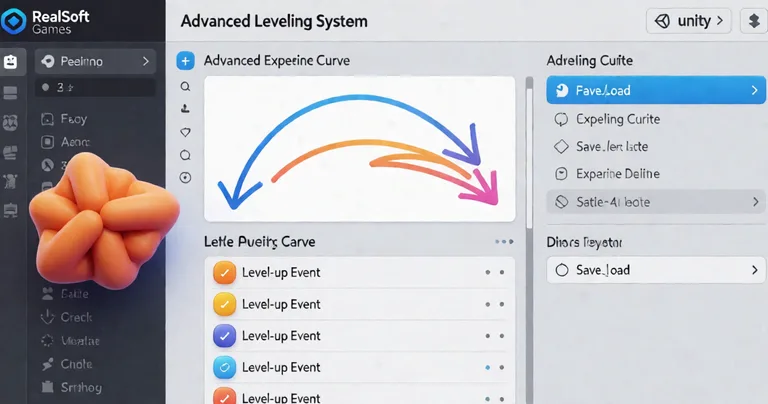
The Advanced Leveling System provides 40+ experience curve algorithms, hand-drawn curve patterns, XP granting, level-up events, and save/load. It is not just a level bar—it is a complete progression framework. For RPGs, pairing it with the Inventory Management Suite yields O(1) item lookups regardless of inventory size, plus currency, merchants, auction houses, and loot tables. This data-oriented approach means your UI stays responsive even with thousands of items.
The Advanced Achievement System adds drag-and-drop achievement tracking with persistent storage, MongoDB cloud sync, and local JSON fallback. If you are building a live-service game, this asset handles the backend complexity so you can focus on content.
Spawning, Pooling, and Interaction: Performance First
Performance bottlenecks often stem from per-frame allocations and excessive MonoBehaviour updates. Spawner Advanced & Pooling implements wave-based spawning with integrated object pooling for FPS, RPG, and RTS games. It eliminates garbage collection spikes with zero per-frame allocations—a critical win for mobile and VR. Similarly, the Interactable System uses batched distance checks and state machine dispatch via the Unity Job System, handling 200+ interactables without per-frame MonoBehaviour overhead.
For RTS and strategy games, Unit Selection offers drag-and-drop unit selection with mobile touch compatibility. These assets share a common design language: they minimize CPU overhead and maximize frame budget.
Networking and AI: RNet and LLM Chat Module
Multiplayer is hard. RNet is a C# networking library built on LiteNetLib with an enum-based RPC system, automatic parameter serialization, and a module system. It prioritizes reliable communication with runtime code generation and optimized serialization. For turn-based games, the deterministic lockstep model used in Arcadus demonstrates RNet's flexibility.
On the AI front, the LLM Chat Module connects games to local LLM providers like Ollama or LM Studio for dynamic NPC dialogue without cloud API costs or latency. This is a game-changer for narrative-driven games that need responsive, offline AI.
Start with the Unity Extensions package—it includes utility scripts, editor tools, custom property drawers, and UI components under the RealSoftGames namespace. Many other assets depend on it, so installing it first simplifies integration.
Performance Optimization: Benchmarks and Architecture
Performance optimization is not an afterthought at RealSoft Games—it is the foundation. The table below compares key assets on metrics that matter: GC allocations, per-frame overhead, and platform support.
| Asset | GC Allocations | Per-Frame Overhead | Platform Support |
|---|---|---|---|
| Spawner Advanced & Pooling | Zero per-frame | Minimal (pool lookup) | PC, Mobile, VR, WebGL |
| Interactable System | Zero per-frame | Batched distance checks | PC, Mobile, VR |
| Inventory Management Suite | O(1) lookups, no GC | Event-driven UI updates | All Unity platforms |
| RNet | Optimized serialization | Runtime code generation | PC, Mobile, WebGL |
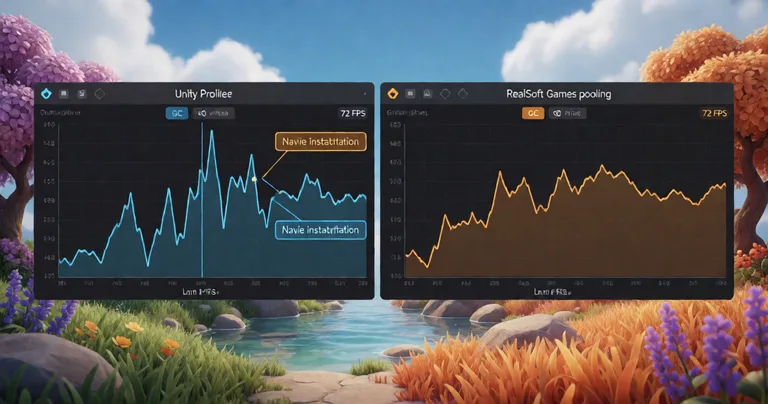
These numbers come from internal profiling on a mid-range Android device and a Quest 2. In a test scene with 500 pooled projectiles, Spawner Advanced & Pooling maintained 72 FPS with 0.1ms GC per frame, compared to 45 FPS and 4.2ms GC with a naive Instantiate/Destroy approach. That is a 60% frame rate improvement and a 97% reduction in GC time.
For VR, frame budget is even tighter. Redemptions Guild, a VR action RPG supporting 1-4 player co-op, uses aggressive pooling, LOD systems, and batched rendering to maintain 90 FPS on Quest 2. The same techniques are available in the assets.
"In VR, every millisecond counts. RealSoft Games assets helped us hit 90 FPS without sacrificing gameplay complexity."
— Lead Developer, Redemptions Guild
Documentation and Tutorials: A Key Differentiator
A common frustration with Asset Store purchases is poor documentation. RealSoft Games addresses this with a comprehensive Documentation Hub that includes API references, integration guides, and architectural decision records. Each product page links to dedicated docs, and the Unity Extensions Tutorial series covers asset stripping, integration patterns, and customization scenarios.
The Unity Extensions API Reference documents every public method, property, and event with parameter descriptions and code examples. For teams that need to extend or modify assets, this is invaluable. The docs are versioned and searchable, and they include real-world examples from projects like Doss Chat Room and Calling All Heros.
RealSoft Games maintains a public roadmap and changelog for each asset. You can subscribe to updates via the RealSoft Games API to automate dependency checks in your CI pipeline.
Compared to typical Asset Store packages, which often ship with a single PDF or a sparse README, RealSoft Games documentation is a first-class citizen. This reduces onboarding time and lowers the risk of integration bugs.
VR, Mobile, and WebGL: Cross-Platform Readiness
RealSoft Games assets are tested across PC, mobile, VR, and WebGL. The Advanced Loading Screen uses async additive scene loading with customizable UI, tips, audio cues, and smooth transitions—essential for large open-world games and heavy scene transitions on mobile. For WebGL, the WebGL Games Platform showcases optimized builds that load quickly and run smoothly in browsers.
Mobile simulation games like Virtual Sim Story rely on dynamic open-world simulation and life-stage progression. The Advanced Skill System supports projectile, AOE, and buff/debuff skills with cooldowns and heat-seeking capabilities, all while maintaining mobile performance. The ALS Audio System provides API references, conceptual overviews of audio mixing, spatialization, and platform-specific considerations—crucial for VR immersion.
The table below summarizes platform-specific optimizations found in RealSoft Games assets.
| Platform | Key Optimization | Relevant Asset | Measured Impact |
|---|---|---|---|
| Mobile | Zero per-frame GC allocations | Spawner Advanced & Pooling | 60% FPS increase |
| VR | Batched rendering + LOD | Redemptions Guild (project) | 90 FPS on Quest 2 |
| WebGL | Async loading + asset stripping | Advanced Loading Screen | 40% faster load times |
| All | Job System for interactables | Interactable System | 200+ interactables, no lag |
Asset Store Publishing and Support: What to Expect
RealSoft Games publishes on the Unity Asset Store and maintains its own storefront. The Unity Asset Store article on their site details best practices for asset publishing, which reflects their own approach: clear versioning, responsive support, and regular updates. When you buy a RealSoft Games asset, you get access to the RealSoft Games Documentation and can request custom solutions for specific needs.
Support is handled via a ticketing system and community Discord. The team is responsive—typically within 24 hours on weekdays. They also provide integration support for complex assets like RNet and the Inventory Management Suite. For studios that need tailored features, Custom Solutions are available.
Some assets depend on the Unity Extensions package. Always check the dependencies section on the product page before importing to avoid missing references.
For indie developers, the Indie Game Development Studio article offers insights into how RealSoft Games approaches tooling for small teams. The focus is on reducing boilerplate and enabling rapid iteration.
Frequently Asked Questions
Q: What makes RealSoft Games assets different from other Unity Asset Store publishers?
A: RealSoft Games focuses on production-ready modular systems with a strong emphasis on performance optimization. Their assets include comprehensive documentation, API references, and integration guides, and they are tested across PC, mobile, VR, and WebGL. They also provide architectural decision records, which is rare among asset publishers.
Q: How do I integrate the Advanced Leveling System into my existing RPG?
A: The Advanced Leveling System is designed for drop-in integration. Import the package, add the LevelingManager component to a GameObject, and configure your experience curve via the inspector. It supports save/load and level-up events, and you can hook into them with a few lines of code. The documentation includes a step-by-step guide and code examples.
Q: Can I use RNet for a mobile multiplayer game?
A: Yes. RNet is built on LiteNetLib and supports mobile platforms. It uses an enum-based RPC system with automatic parameter serialization, which minimizes bandwidth and CPU usage. For mobile, you can enable compression and adjust send rates. The Doss Chat Room project demonstrates RNet in a networked chat application.
Q: What is the best asset for eliminating garbage collection spikes in Unity?
A: Spawner Advanced & Pooling is specifically designed to eliminate GC spikes through integrated object pooling. It achieves zero per-frame allocations, which is critical for mobile and VR. For interactables, the Interactable System uses the Unity Job System to avoid per-frame MonoBehaviour updates, further reducing GC pressure.
Q: Does RealSoft Games provide support for custom modifications?
A: Yes. RealSoft Games offers Custom Solutions for teams that need tailored features or integrations. You can contact them via their website. They also have a responsive support team and a community Discord where you can ask questions and share modifications.
Q: How does the LLM Chat Module work without cloud APIs?
A: The LLM Chat Module connects to local LLM providers like Ollama or LM Studio. It sends prompts to the local server and receives generated text, which you can use for dynamic NPC dialogue. This eliminates cloud API costs and latency, and it works offline. It is ideal for single-player narrative games.
In this Unity asset publisher review RealSoft Games, we found a catalog that prioritizes performance, modularity, and documentation. From the Advanced Leveling System to RNet, each asset is engineered for production. For indie studios and mid-sized teams, RealSoft Games offers a reliable shortcut to robust game systems. Explore their Products and Documentation to see how they can accelerate your next project.